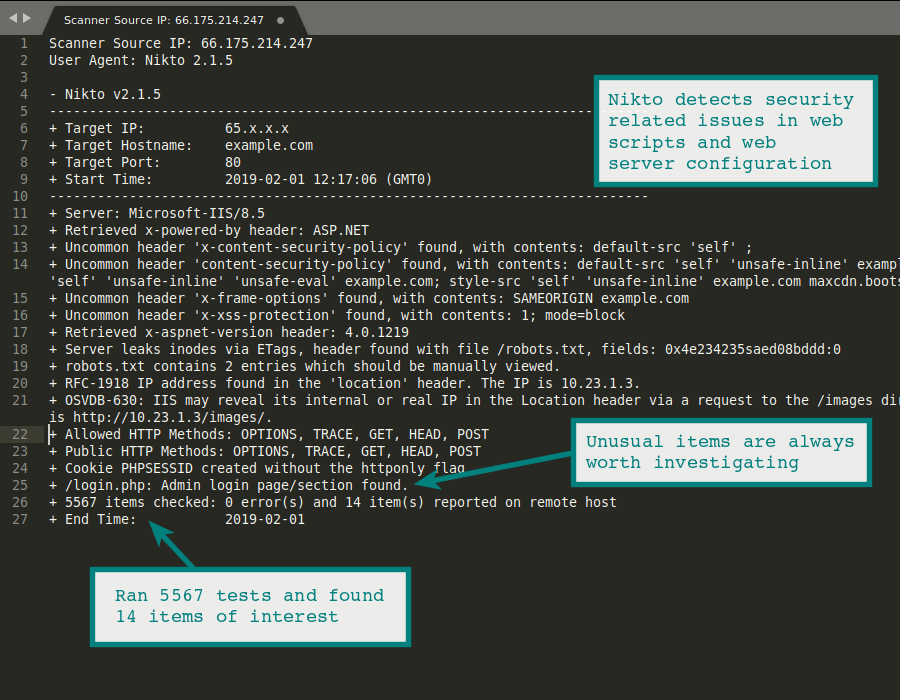
Scan your web site and server immediately with the popular Nikto Web Scanner. This testing service can be used to test a Web Site, Virtual Host and Web Server for known security vulnerabilities and mis-configurations.
Nikto performs over 6000 tests against a website. The large number of tests for both security vulnerabilities and mis-configured web servers makes it a go to tool for many security professionals and systems administrators. It can find forgotten scripts and other hard to detect problems from an external perspective.
*A membership of STARTER level is required to use the Nikto Web Server Scanning.
Membership Benefits
Tap into the potential for advanced exploitation or vulnerability assessment of web servers and websites with exclusive access.
Discover
Discover known web application and script vulnerabilities in a website
Test
Test for web server configuration mistakes that could impact security.
Access
Access granted to 27 Vulnerability Scanners & IP Tools.
Identify
Identify installed software on web servers via headers, favicons and files.
Assess
Assess effectiveness of an intrusion detection system (IDS)
OSINT
Access to 27 Vulnerability Scanners and OSINT Tools
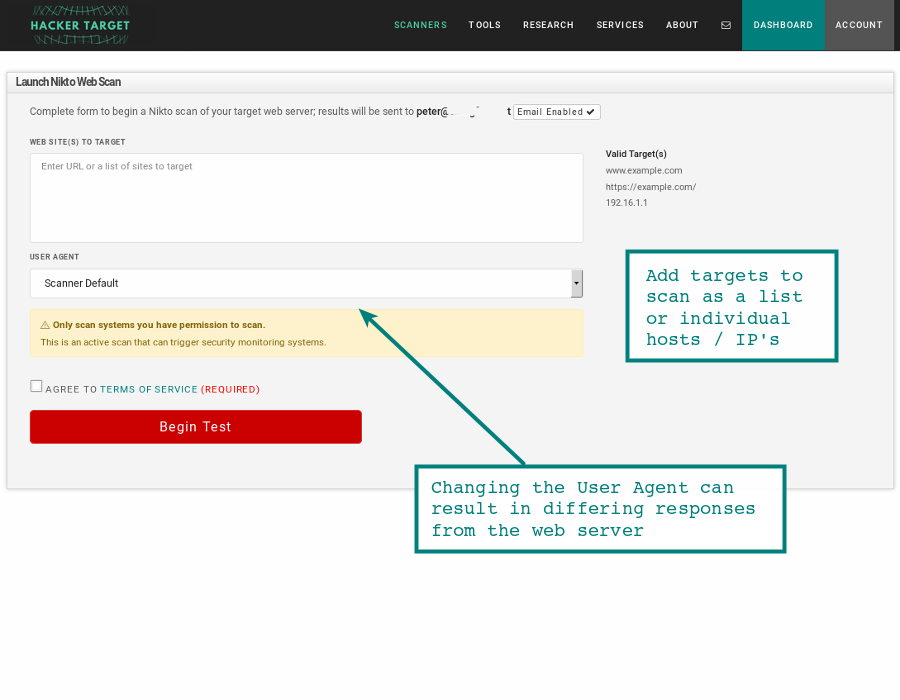
How to Run a Nikto Web Server Scan
Step 01
Enter your target
Enter a public IP address or hostname.
IP address or Hostname
Single — 192.168.1.1
List — 192.168.1.1, example.com
IP Range
CIDR — 192.168.1.0/24
Hyphenated — 192.168.1.1-50
Only scan systems you have permission to.
Step 02
Choose a User Agent
The User-Agent identifies the client type to the target server.
Change it to test how the server responds to different browsers, crawlers, or mobile clients.
Useful when scans are being blocked or filtered.
Step 03
Submit and Monitor Results
The scan runs automatically once submitted.
Allow up to 45 minutes for completion. Duration depends on server response times and number of checks performed.
Results are emailed to your registered address and available to view and download in the Members Dashboard.
Want to get more from your scan?
If your web server hosts multiple sites using virtual hosts. You should test each virtual host using Nikto to get greater vulnerability coverage. In fact it can be helpful to scan the IP address as well as the hostname of the server to ensure all paths are tested for any vulnerable web applications and scripts.
Understanding False Positives
Nikto checks hundreds of URLs, which can produce false positives when a server returns 200 OK for missing pages. These are easy to spot as a pattern and straightforward to verify manually.
Covers target selection, interpreting output, partial scans, error handling, and next steps. It is a useful reference alongside this tool.
About the open source Nikto tool
 The Nikto web server scanner is a security tool that will test a web site for thousands of possible security issues. Including dangerous files, mis-configured services, vulnerable scripts and other issues. It is open source and structured with plugins that extend the capabilities. These plugins are updated with new security checks.
Nikto is by no means a stealthy tool. It will make thousands of HTTP requests to the web server, creating a large number of entries in the web servers log files. This noise is an excellent way to test an in place Intrusion Detection System (IDS). Any web server log monitoring, host based intrusion detection (HIDS) or network based intrusion detection (NIDS) should detect a Nikto scan.
Nikto includes built-in evasion techniques -evasion for IDS bypass, these are available when running a local installation. The online scanner runs a default scan with no evasion applied.
The Nikto Web Vulnerability Scanner is a popular tool found in the toolkit of many penetration testers and security analysts. It will often discover interesting information about a web server or website that can be used for deeper exploitation or vulnerability assessment.
 "Before you receive that notice or your site falls prey to a cyber attack, install Nikto on a remote computer and begin your assessments."
Linux Magazine.
Discover More About HackerTarget
Discover
Vulnerability Scans & Network Intelligence
Map your attack surface, enumerate hosts, and identify open vulnerabilities across your perimeter.
Use Cases
Recon
Enumerate & Discover
Know the Network
Resolve DNS records, geolocate IPs, trace network paths, and uncover ASN ownership for any target.
IP & DNS Tools
Access
30 Hosted Scanners & Network Tools
Unlock the full toolkit; automated scans, DNS enumeration, port scanning, and more.
View Membership