The OpenVAS scanner is a comprehensive vulnerability assessment system that can detect security issues in all manner of servers and network devices. Use this hosted version of the OpenVAS software to effortlessly test your Internet infrastructure.
Results are delivered to your email address for analysis, allowing you to start re-mediating any risks your systems face from external threats.
The primary reason to use this scan type is to perform comprehensive security testing of an IP address. It will initially conduct a port scan of an IP address to find open services. Once listening services are discovered, they are tested for known vulnerabilities and misconfiguration using a large database (more than 53000 NVT checks). The results are compiled into a report, including detailed information regarding each vulnerability and notable issues discovered.
Once you receive the results of the tests, you will need to check each finding for relevance and possibly false positives. Any confirmed vulnerabilities should be re-mediated to ensure your systems are not at risk.
A secondary use of this scan type is to test incident response processes and Intrusion Detection / Prevention systems. Being an aggressive and noisy scan type; security network monitoring should detect the scan and provide alerts to your security monitoring solution
Vulnerability scans performed from externally hosted servers give you the same perspective as an attacker. This has the advantage of understanding exactly what is exposed on external facing services.
Sample OpenVAS Reports
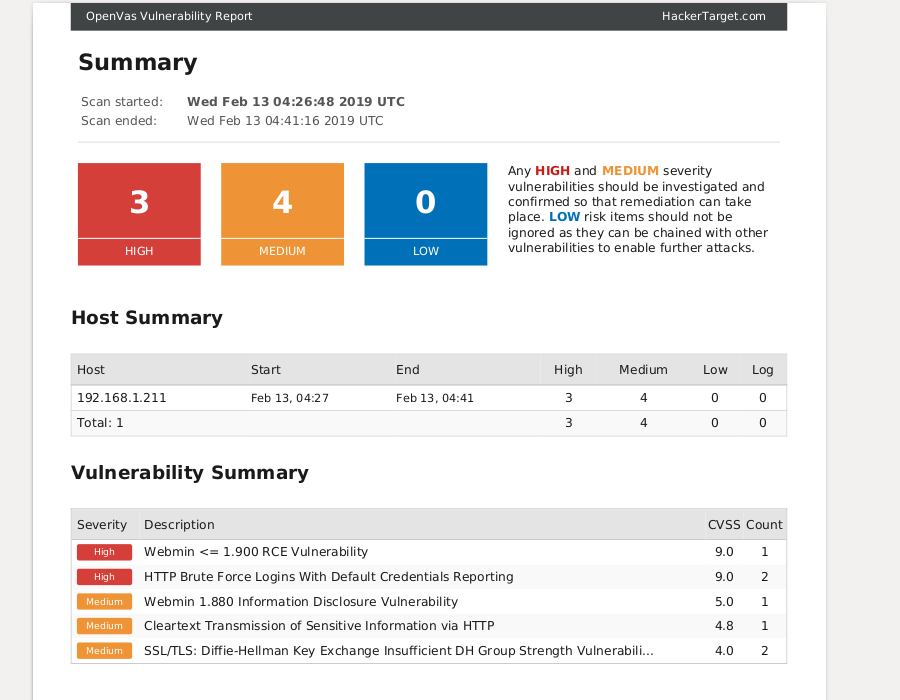
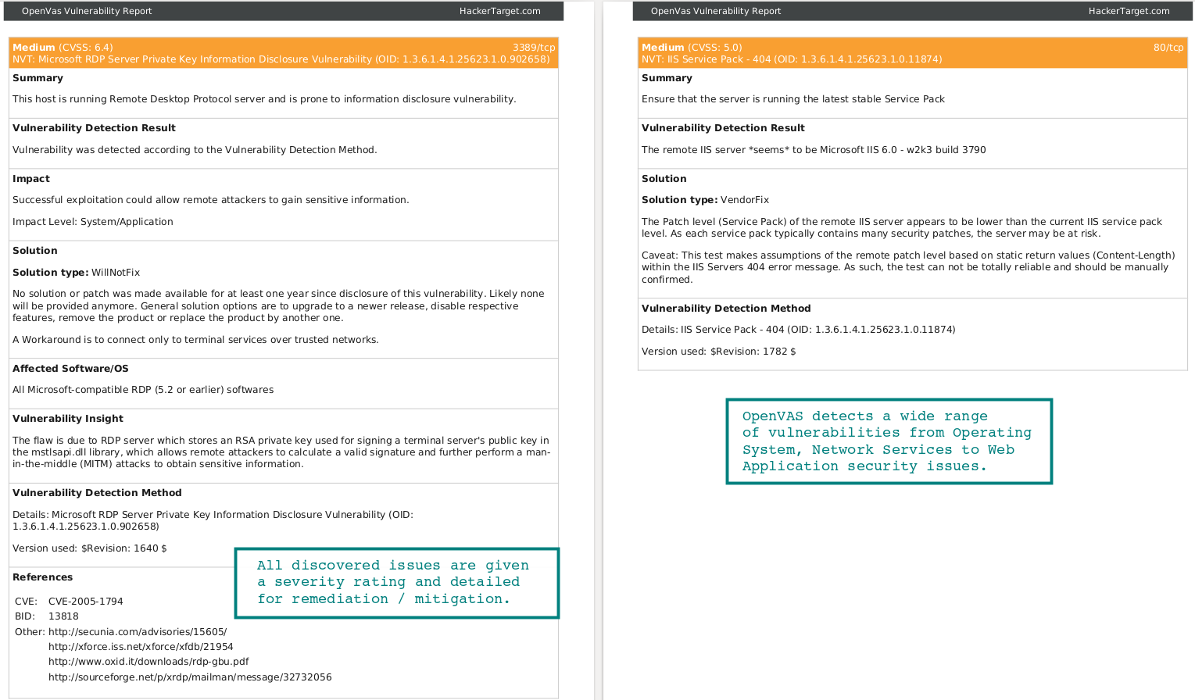
Sample reports generated by running OpenVAS against a number of test systems. Review the reports to see the wide range of vulnerabilities that can be discovered.
Apache Tomcat
Linux server running Apache Tomcat. Multiple issues found.
Windows 2016
Vulnerability Scan of a default Windows 2016 Server (Essentials).
WordPress
Scan of an Ubuntu host running an old version of WordPress.
Metasploitable
Insecure system for testing, with critical vulnerabilities.
How does the hosted OpenVAS process work?
1. Enter the target to scan
Depending on your goals and the target being tested; enter an IP address, a range of IP addresses (PRO membership required) or hostname. Different targets can be entered as a list to run as separate jobs or as a single job for a consolidated report.
Target host name will be resolved to all its IPv4 and IPv6 addresses for testing.
No hosts found? Blocking ICMP? It is recommended to allow ICMP from our servers so that host discovery is successful. If icmp (ping) is blocked the following TCP ports will be tested to determine if the host is alive (21, 22, 23, 25, 53, 80, 110, 111, 135, 139, 143, 443, 445, 993, 995, 1723, 3306, 3389, 5900, 8080, 137, 587, 3128, 8081).
2. Select scan type
Multiple options are available depending on the type of system to be tested.
Full Scan for a full test of network services and web applications.
Web Server Scan a more focused test for web server and web application vulnerabilities (ports 80 and 443 only).
WordPress Scan testing for known WordPress vulnerabilities and web server issues (ports 80 and 443 only).
Joomla Scan testing for known Joomla vulnerabilities and web server issues (ports 80 and 443 only).
3. Launch the Vulnerability Scan!
Testing will begin and the target system(s) will be probed in order to discover vulnerabilities that could place the system at risk of compromise. Results will be available from 15 minutes to a number of hours depending on the target selection.
OpenVAS has remote detection signatures for Log4j vulnerability discovered 9th of December of 2021. See our overview for more on detection and mitigation of Log4j.
Technical details of the scan configuration
Scanner Infrastructure
The latest version of OpenVAS/GVM is hosted on a cluster of high-performance servers. The vulnerability database (NVTs) is updated multiple times per week using the Community Feed (open-source signature feed).
Note: For enterprise-grade internal network scanning or software vulnerability testing, we recommend the
Greenbone Security Manager appliance range. These can be combined with our external scanning tools for full network attack surface coverage.
Scan Profile
All scans use a configuration based on the "Full and Fast Scan" profile, optimized for comprehensive vulnerability detection with reasonable performance.
Host Discovery Logic
Before scanning, the target host must be found to be alive. This is determined using:
ICMP Echo Requests (Ping)
If ICMP fails, a TCP port check is performed against common ports
If no response is received via ICMP and no open TCP ports are detected, the host is considered unreachable, and no full scan is performed.
Interpreting Missing Hosts in the Report
If your report summary indicates missing hosts, this means those targets were not detected as alive. Common reasons include:
No ICMP response (ping blocked)
No common TCP ports open
Firewall or Intrusion Prevention System (IPS) blocking traffic
Important: Scanning systems protected by WAFs or IPSs often leads to timeouts, incomplete scans, or rate-limited responses, which may degrade scan accuracy.
Scan Duration and Limitations
Scan Time Limit: Each scan is limited to a maximum of 24 hours. If not completed, the report will still be generated and marked as incomplete.
Parallel Scanning: All targets in a scan are handled by a single server. For improved performance, split large jobs into smaller scans, distributed across multiple servers.
Result Limit: A maximum of 2,500 results is returned per scan. If this limit is reached, split the scan into smaller batches.
WAF / Cloudflare Limitations / Recommedations
Scanning targets behind Web Application Firewalls (WAFs) such as Cloudflare can be:
Unreliable, due to rate limiting or IP blocking
Very Slow, with delayed or dropped responses
Recommended: If scanning through CloudFlare it is highly recommended to use the Web Server scan profile, as this will only scan ports 80, 443 - and will considerably speed up the scan. If scanning the origin server directly, the full scan profile can be used for more comprehensive testing.
Specialized Scan Types
Web Server Scans: Limited to ports 80 (HTTP) and 443 (HTTPS)
Nikto Scanner: A standalone tool for focused web server security scanning
"Continuously acquire, assess, and take action on new information in order to identify vulnerabilities, remediate, and minimize the window of opportunity for attackers."
– Center for Internet Security Control 4: Continuous Vulnerability Assessment and Remediation
About the GVM / OpenVAS project
OpenVas / GVM is an open source vulnerability scanner that can test a system for security holes using a database of over 95’0000 NVT test plugins. This covers more than 185000 CVE's. The complete OpenVAS suite consists of a number of components that provide a framework for management of a complete vulnerability management solution.
Whether you are using the standalone tool or the service we offer here OpenVAS is a excellent way to test an Internet connected server, firewall and listening services for configuration errors and known vulnerabilities.
Commercial Security Scanning Solutions
Depending on your needs and your budget there are a number of different well known vulnerability scanners available. A number of years ago I did a comparison of OpenVAS against other leading solutions. My conclusion was that no single solution will provide 100% coverage.
For those with the budget running OpenVAS alongside a commercial vulnerability scanner can be an excellent way to validate results and get a more accurate picture. Comparing results from two or more different solutions can reveal false positives and false negatives.
Best practice vulnerability scanning requires that you utilize multiple tools. This is similar to email threat mitigation using multiple solutions (an email filtering gateway and a local end point anti-virus product that use different scan engines). While you may use a commercial vulnerability scanner or service such as Greenbone Security Manager, Nessus, Nexpose or GFI Languard; having a hosted version of OpenVAS available is excellent way to get a second set of results for a public Internet facing service.
One of the advantages of OpenVAS being open source, is that when you receive a false positive; you are able to review the plugin to determine why the vulnerability was flagged. OpenVAS has a strong community of security practitioners and posting any false positive to the OpenVAS mailing list often results in immediate feedback. This can result in the false positive being fixed within hours to the benefit of the whole community.